
On almost every company website, the path to a customer ends at a form. Name, email, phone, subject, message. Whoever fills it in has to know what they need and say it in your terms. Whoever can't writes "please call me back" or leaves. The classic way out is called a lead magnet: a checklist or whitepaper in exchange for an email address. That gets you an address, but not an inquiry.
AI opens a third way: the visitor describes what they need the way they would say it themselves and immediately gets something back that applies only to them. This article shows three such entry points running live on our sites, the rules we build them by, and when a normal form is the better choice. And it is one itself: further down, you can try with one sentence about your business what such an entry point would do for you.
Contact form
- Visitorhas to know what they need
- Twenty fieldsin your terminology
- Inquiryoften “please call me back”
The work is on the visitor. Whoever can't classify their project drops out or writes one sentence that you first have to turn into an inquiry on the phone.
PDF for email
- Visitor
- Checklistthe same for everyone
- Email addressno project behind it
You get an address but learn nothing about the project. Whether it becomes a customer only shows after weeks of follow-up.
AI entry point
- Visitorone sentence, an address, a question
- Instant resultonly for their project
- Inquiry with substancechecked and completed
The visitor sees first what they get. The inquiry that reaches you afterwards is already sorted.
What is an AI lead magnet?
A lead magnet is anything a visitor willingly gives you their contact details for. With an AI lead magnet, that's not a document but a result: the visitor enters something of their own, a model evaluates it, and they immediately see what it means for them. Only afterwards, if they want to continue, does the page ask for name and email.
The difference is the order. The form wants something first, and so does the checklist. The AI entry point gives something first. And because the visitor has described their own project along the way, you end up knowing more than just their address.
Three examples running live
die macher: one sentence becomes an inquiry with trades
die macher is our matchmaking platform for renovation and conversion: customers describe their project, trades from the partner network carry it out. Whoever requests a project there rarely knows which trades they need. Instead of a list of checkboxes, the homepage has one field: "Describe your project in one sentence." By text or, after consent, by voice.
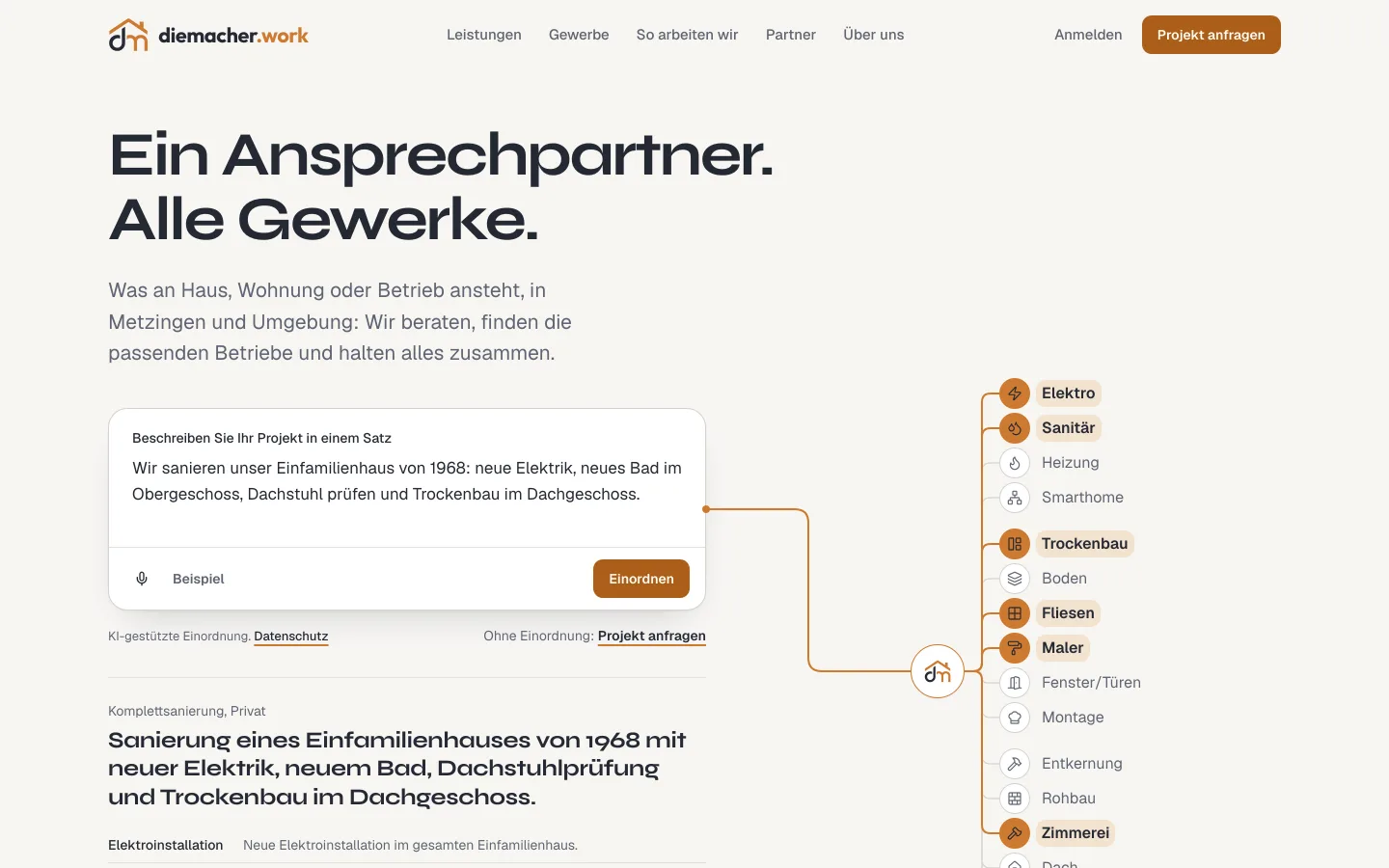 The AI entry point at die macher. From the sentence, the model derives the project type and trades.
"We want to completely redo the bathroom upstairs" becomes a project type, a list of trades in the order they work on site, one sentence of scope for each, and at most one follow-up question, such as the size of the bathroom. The customer sees this as a trade network, changes what's wrong and sends the inquiry. Whoever doesn't want to use AI skips the field and goes straight to the form.
Shopify Check: an address becomes a diagnosis
With the Shopify Check, a store owner enters only the address of their store. The check reads public pages, examines languages, the Google connection, load time and apps, and shows the first findings while it runs. The three most important are written out in full, without sign-up.
- Store addressthe only field
- Live checkprogress visible
- First findingsfree, no sign-up
- Only here: dataEmailfor all findings with solutions
- Confirmationdouble opt-in
- Conversationwith the findings on the table
Only those who want to see all findings with a way to fix them enter their email address and confirm it. What reaches us then isn't a bare address but a store with a diagnosis. That's why the first conversation doesn't start with "So what do you actually do?" but with the biggest finding.
AI answers in the FAQ: a question gets answered
On our homepage, the last line of the frequently asked questions is an input field. Whoever has a question that isn't listed types it in and gets an answer from the content of this website, with a link to the matching page. Strictly speaking that's not a lead magnet, because nothing is exchanged for data. But it catches the visitors who would otherwise leave with an open question.
Try it with your business
Instead of a fourth example of ours: one of yours. Describe in one sentence what your customers ask for. The AI shows how a customer might write to you and what an AI entry point makes of it.
This box works the same way: the result first, contact details only if you want to continue.
What a good AI entry point needs
All three examples follow the same rules. They don't come from a textbook but from what can go wrong while building.
- A narrow task with a fixed answer format. The model at die macher may only choose trades from a fixed list and must answer in a fixed schema. It writes no prices, no names, no commitments. The narrower the task, the more reliable the result.
- The result is a suggestion. The customer sees what the AI derived and changes it before sending. Nothing is decided automatically.
- A path without AI. Whoever doesn't want to type, doesn't want AI or has their microphone blocked still gets to the inquiry.
- Recognizable as AI. The visitor knows a model is answering. The EU AI Act requires this for such systems in Art. 50, and it's fair anyway.
- No contact data sent to the model. Only the text or address is evaluated, not name, email or phone. What goes where is in the privacy policy.
- Give first, then ask. Name and email come after the first result, not before. Whoever drops out at that point wouldn't have filled in the form either.
- A limit for abuse and cost. Every call costs money. Bot protection, a cap per visitor and a fixed monthly budget belong in from the start, not after the first bill.
What happens to the inquiry afterwards
The entry point is half the work. The other half is what arrives on your side. Because the visitor has already described their project and the AI has sorted it, the inquiry lands in your system in structured form: project type, trades and scope at die macher, store and findings with the Shopify Check. With us, a confirmed check inquiry goes straight into the CRM, with a first assessment of how well the store fits us.
That saves more than typing. You see what it's about before the first call and can decide who calls and with which proposal.
When it isn't worth it
Honestly: not for every website. An AI entry point pays off when your customers find it hard to classify their own request and today you mainly sort things out in the first phone call. Trades, planning, consulting, anything with several building blocks.
It doesn't pay off when your inquiries come almost entirely through referrals, when your offer consists of three clear packages, or when hardly anyone visits your website. Then a good, short form is enough, and the money is better spent elsewhere. How to find such opportunities in general is covered in AI for SMEs.
What is an AI lead magnet?
An offer on your website where the visitor enters something of their own, such as one sentence about their project or the address of their store, and immediately gets a personal result. The page only asks for contact details afterwards, if they want to continue.
Is an AI entry point better than a contact form?
If your customers find it hard to describe their request themselves, yes: the AI sorts, the customer checks, and you get an inquiry with substance. For simple, clear offers, a short form is the better choice.
What does running an AI entry point cost?
Every evaluation is a model call and is billed by usage. How much that adds up to per month depends on the model, text length and number of visitors. What matters is capping the cost: bot protection, a limit per visitor and a fixed monthly budget.
Am I allowed to use AI on my website for inquiries?
Yes, if you disclose that an AI system is answering, process only what the evaluation needs, and describe it in your privacy policy. The decision about the inquiry should stay with the customer and with you, not with the model.
What happens if the AI gets it wrong?
That's why the result is a suggestion: the customer sees it before sending and changes what's wrong. A narrow task with a fixed selection, such as only trades from a list, makes errors rare and easy to spot.


